
FANTASY. WITH PICKS.
Virtual money. Pick real games before kickoff. Finish with more than your weekly rival to win. Fresh bankroll next week. Your record gets you to the playoffs.
No deposits. No cash bets. No cash prizes.
Try the season demo Find a specific answerOne pick can change your week.
Try the outcomes on this sample $100 ticket. You and your rival both qualified; the higher final balance wins.
Your league sets the starting bankroll. This example starts at $1,000.
ONE PICK. YOUR WEEK.
$250 returned · $150 profit
- Your finish
- $1,150
- Your rival
- $1,080
$1,000 start − $100 stake + $250 return. Both players qualified; your higher balance wins.
One sample ticket, no other picks. Your league sets the starting bankroll.
THE FULL PLAYBOOK
Open a topic for the details and screenshots.
Screenshots use a sample league with synthetic prices and results. Your league’s names, limits and dates may differ. All bankrolls are virtual.
GET INYour invite is the starting line.
- Open the commissioner’s invitation link. Check the league name and accept.
- Choose Continue with Google to use your Google identity. You don’t need to create a separate LineHuddle password for a new Google account.
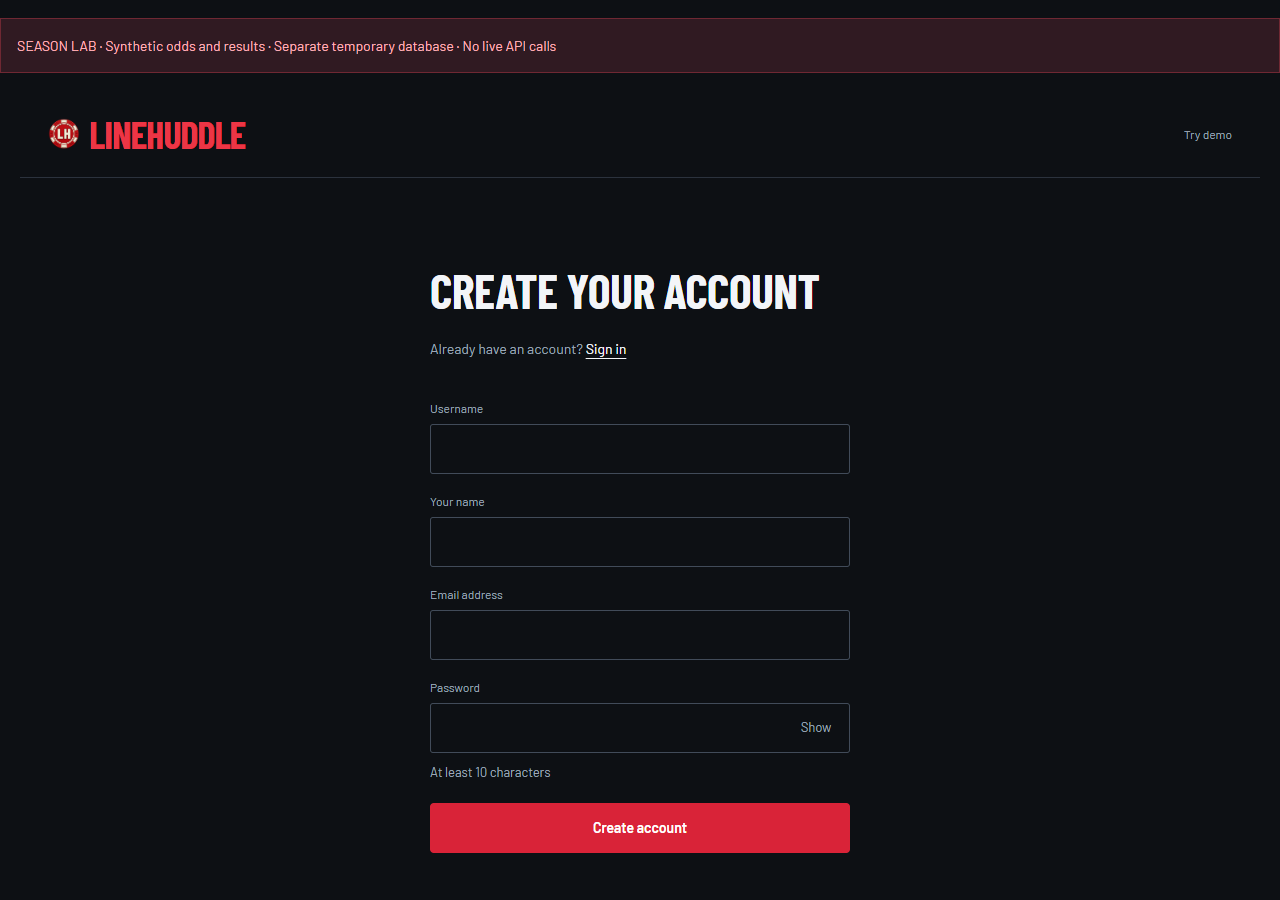
- Prefer a username? Choose Sign up, enter your name, email and a password of at least 10 characters. Save the recovery code and open the verification email. After verification, finish team setup. If you opened another tab, your invitation also appears under Your leagues.
- Set your team name and choose a helmet. Existing accounts go straight to team setup. Your account name is used if you leave the team name blank.
Joining is immediate unless your commissioner requires approval. Join before the scheduled season start; late entry is closed. Returning? Sign in the same way you joined. Your initials in the header open Account settings and Sign out.
COMMISSIONERSet the season. Bring the crew.
- From Leagues, choose New league. Name the league and your team.
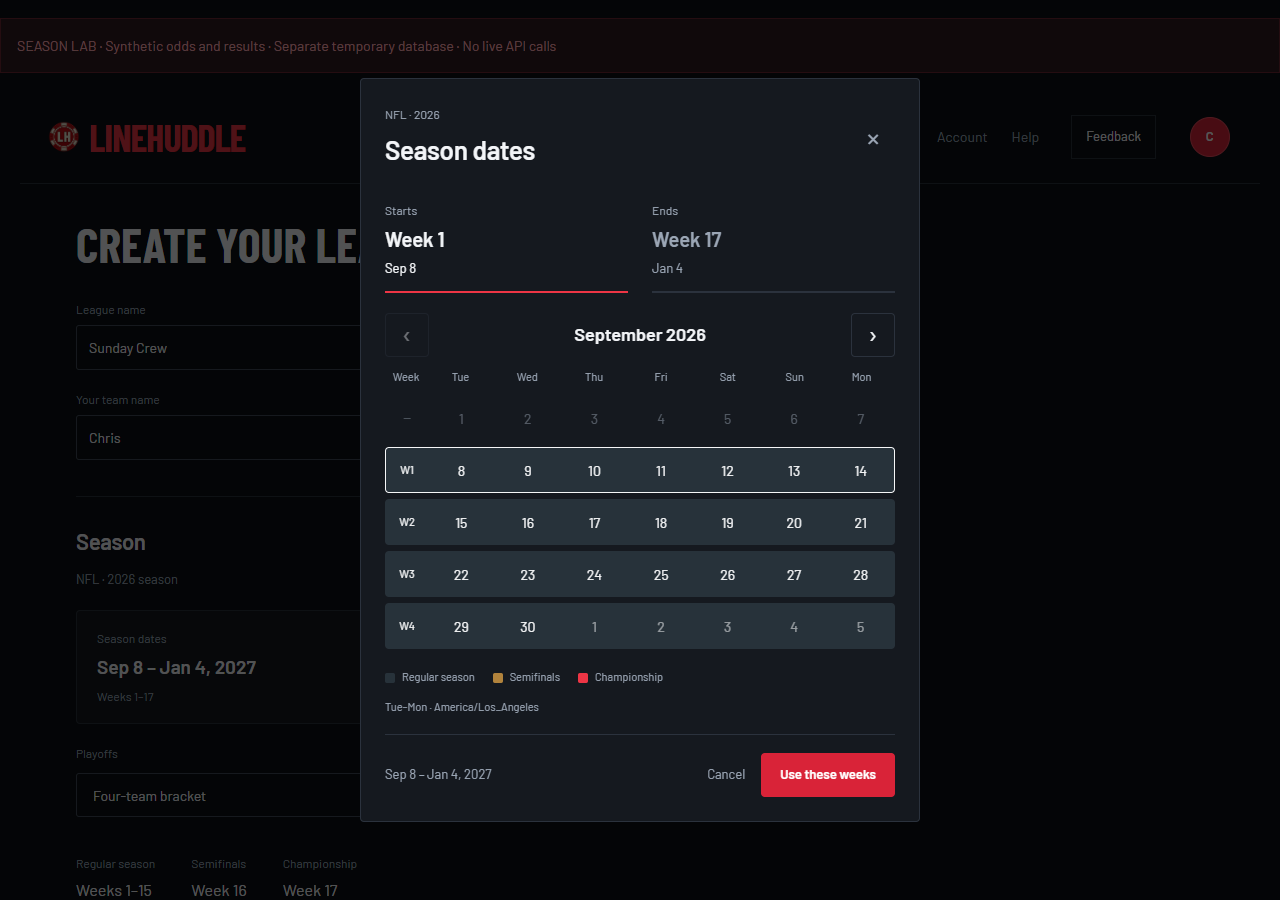
- Open Season dates. Choose the first and last NFL weeks in the calendar, then Use these weeks. The highlighted weeks show regular season, semifinals and championship. Cancel leaves your dates unchanged.
- Set team count, league timezone, weekly bankroll, stake limits and parlay rules. The small help controls explain each setting. Custom playoff cash appears only when you choose a custom amount.
- Create the league. Open Commissioner Tools for settings and the invitation list. Send invitations, check who has joined and approve pending requests. The season starts automatically at Tuesday midnight in the league timezone for your first selected NFL week.
You’ll see Commissioner view if you own the league. Other members see Player view. The scheduled start locks competition settings and closes joining. An undersized roster stays in preseason; if opening games have begun, choose a future starting week. With playoffs on, at least four teams must be in; without playoffs, at least two. Even numbers work best; odd leagues rotate byes.
GAMES & BET SLIPPick a side. Back it.
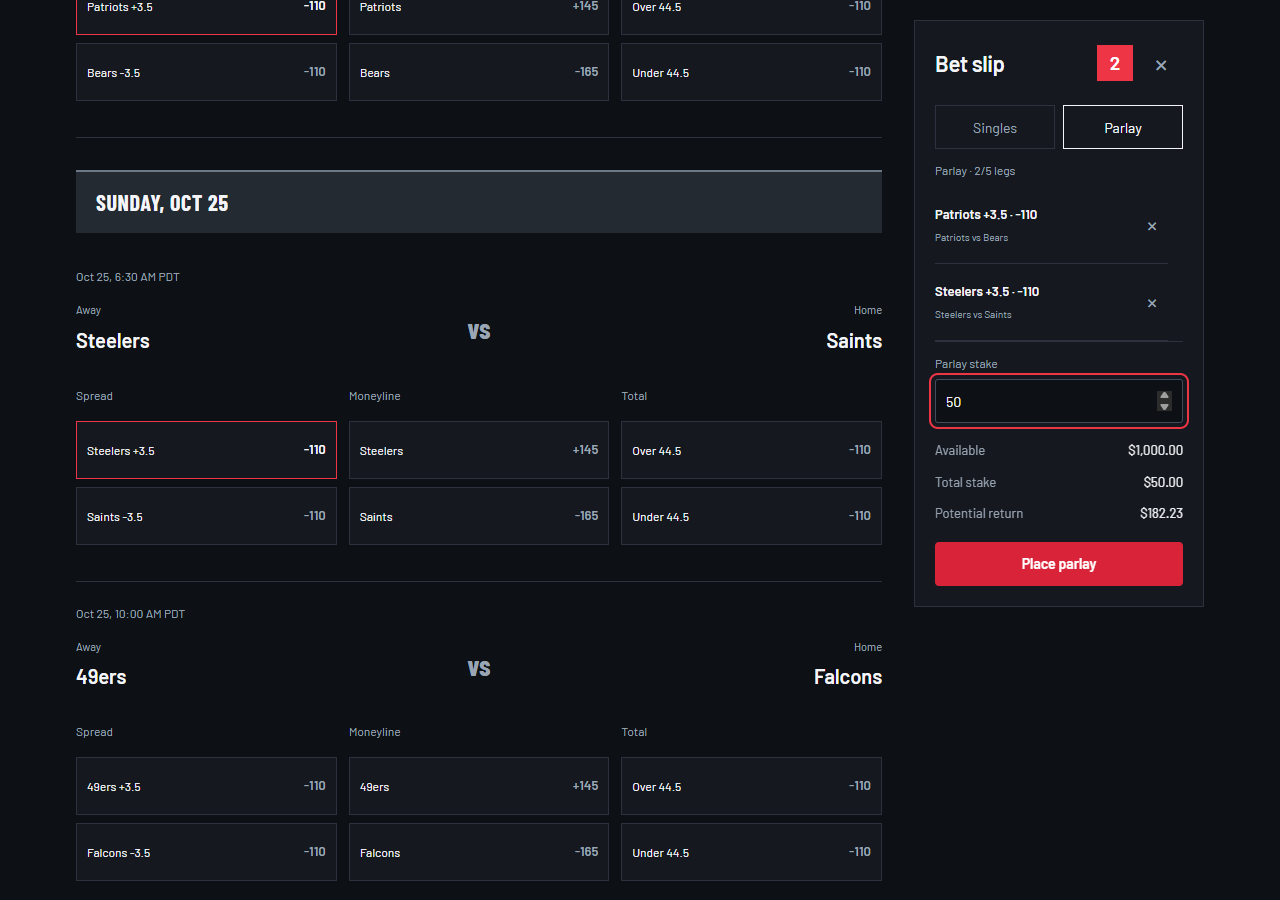
Open your league’s Games tab. Games are grouped by kickoff day; Away and Home sit above the team names. Times display in your account timezone. Hover, focus or tap a market heading for its explanation.
- Moneyline
- Pick the team to win. At +150, a $50 stake wins $75 profit; the total return is $125. At −110, a $50 stake returns about $95.45 if it wins.
- Spread
- Pick a team against a handicap. At −3.5, it needs to win by 4 or more. At +3.5, it can win outright or lose by 3 or fewer.
- Total
- Pick Over or Under the combined score. Over 44.5 wins at 45 or more; Under wins at 44 or fewer.
- Parlay
- Combine picks from different games into one ticket. Every active leg must win. A losing leg loses the ticket. One pick per game; your league sets the leg limit.
- Select a line. It appears in Bet slip. Choose Singles for separate tickets or Parlay for one combined ticket.
- Enter the stake. In Singles mode, that amount applies to each pick. Check Total stake, Available and Potential return. Return includes your original stake.
- Remove one pick with its X, or use the X beside the slip count to clear all draft picks. On desktop the list scrolls inside the slip, keeping the stake and submit controls visible. On a phone, use the bottom Bet slip button, then Back to games.
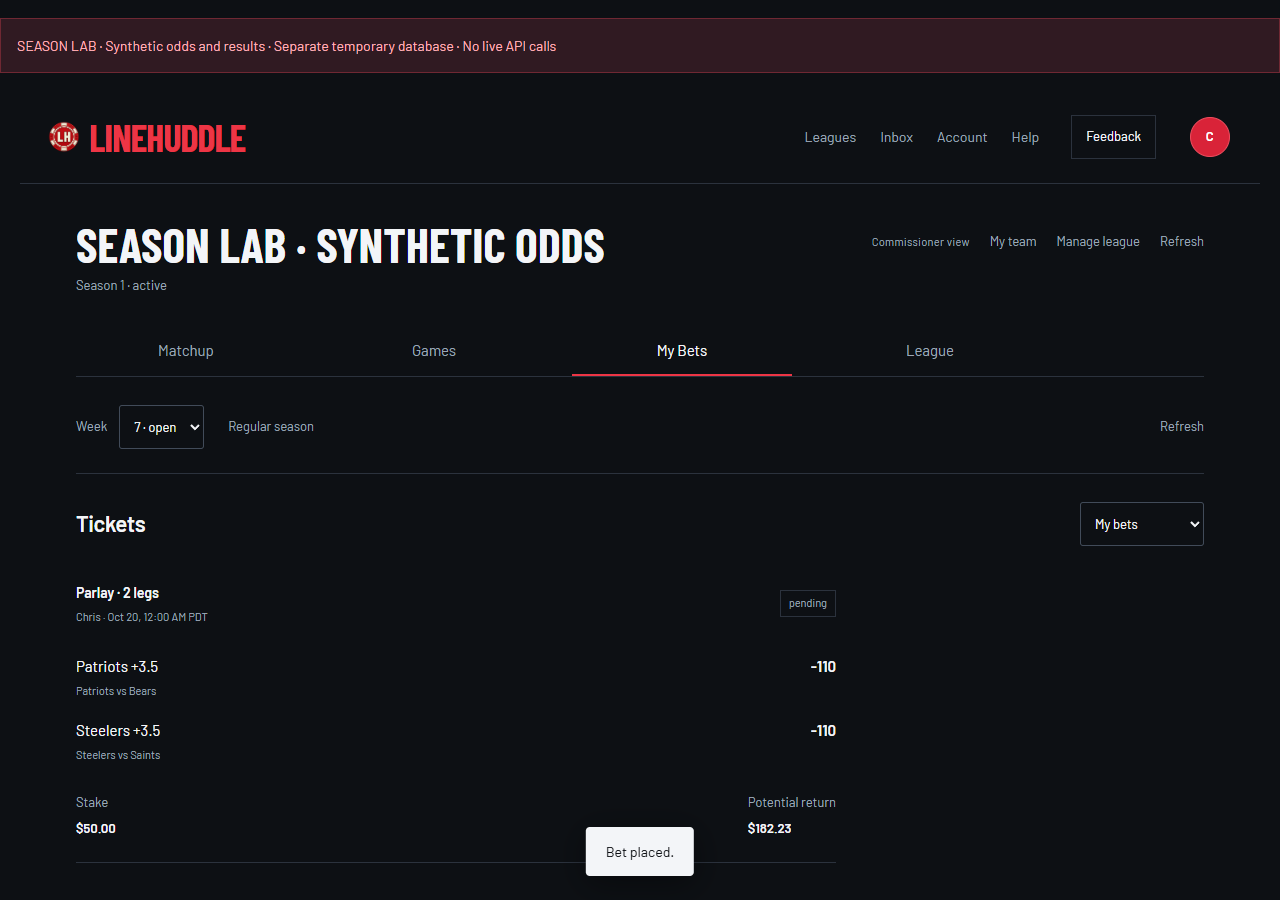
- Choose Place single, Place singles or Place parlay. A “Bet placed” message confirms acceptance; the ticket then appears in My Bets.
V1 is pregame only. Picks lock at kickoff. Accepted odds stay fixed, even when the market moves. If a price changes before acceptance, review the updated slip and submit again. Accepted tickets cannot be edited or canceled.
What if the connection drops when I submit?
Use Retry unconfirmed request. It checks the original request without placing a duplicate. The app preserves that request across reloads. Clear-all and pick edits are unavailable until the outcome is confirmed.
What if lines are unavailable?
A paused or stale feed blocks new bets until current prices are available. It doesn’t cancel accepted tickets. Refresh to check again; repeating Refresh cannot override a pilot credit limit.
PILOT ODDSKnow when the lines move.
Check the feed status before building your slip. The pilot uses shared, scheduled snapshots. The countdown shows the next planned update; capture times show the age of the prices you are playing.
How current are the odds?
LineHuddle uses DraftKings prices through The Odds API. The pilot uses timestamped snapshots, not streaming odds. A snapshot stays playable until its next scheduled refresh or two hours after capture, whichever comes first. Check the snapshot capture time above the games. Prices can differ from DraftKings between updates. We reject source prices already more than two minutes old when fetching a new snapshot.
When do prices refresh?
Tuesday, Wednesday, Thursday and Sunday: every two hours from 6 AM through 8 PM Pacific, within the 6 AM–9 PM daytime window. We also schedule a refresh 15 minutes before each NFL kickoff group, including Monday and unusual Friday/Saturday games. Games with the same kickoff share one update. The countdown in the top right shows the next planned attempt. Timing follows the confirmed schedule for active league weeks; updates can arrive shortly after the countdown reaches zero.
What happens between refreshes?
You can bet at the displayed evaluation snapshot while it remains valid and the game has not started. Opening Games, reloading or submitting a ticket does not force an extra paid refresh. The shared server handles scheduled updates while an active league has upcoming games. A restart catches up only the latest recent slot, not every missed update. Outside refresh windows, expired snapshots pause new betting until another update; accepted tickets remain safe.
Why are new bets sometimes paused?
The funded pilot shares a 20,000-credit monthly allocation, with a protected 1,000-credit reserve and a 19,000-credit monthly request ceiling. The existing scheduled refreshes stay in place. Each full moneyline/spread/total snapshot costs three credits for the whole platform, not per player or game. Other usage can exhaust a shared limit first. Refresh cannot bypass a limit. If current prices are unavailable, new bets pause; accepted tickets remain safe.
Which price does my ticket keep?
Your ticket keeps the exact line and odds accepted from the current evaluation snapshot. If a scheduled update changes that price before acceptance, review the updated slip and submit again. V1 is pregame only: the server rejects every new bet once its game reaches kickoff, even if you left an old page or slip open. An already accepted ticket cannot be edited or canceled.
Do game results follow the odds refresh timer?
No. Schedule and result checks run separately from price requests. Accepted tickets wait for final results, and later corrections can update grades and standings. A price-feed pause does not cancel your accepted bets. The pilot is configured to stop new price requests on January 6, 2027 at 12:00 AM Pacific. That includes the Week 17 correction window.
MY BETSYour picks, all accounted for.
My Bets shows accepted tickets for the selected week: locked odds, every leg, stake, status and potential or actual return. Use the week selector to look back. An unsubmitted draft exists only in your slip.
Use Whose tickets to see a particular opponent or all league bets. You can also click a team in Matchup or League to open its tickets. Accepted picks are visible immediately to fellow league members; draft picks stay private.
Pending, won, lost, push or void?
Pending means grading isn’t final yet. Won returns stake plus profit; lost returns nothing. A single that pushes or is void returns its stake. A pushed or void parlay leg is removed and the return is recalculated from the remaining legs. If none remain, the stake is refunded. Results are rechecked automatically; corrected scores can update grades and standings.
MATCHUPOne opponent. One week.
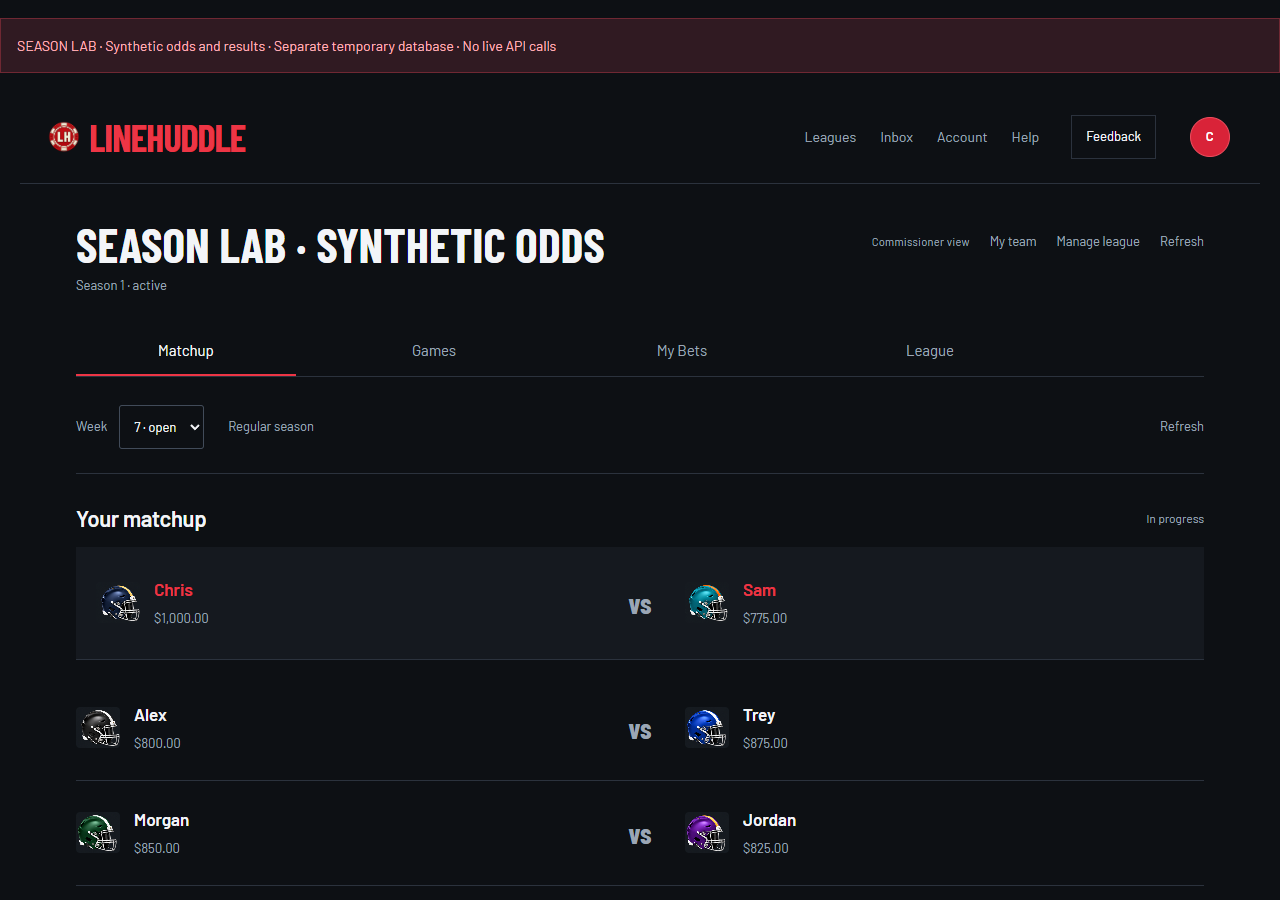
Your weekly bankroll resets to the league’s starting amount. Last week’s winnings don’t carry into the next week, but your season profit still counts. Settled returns can be used again in the same week when the league allows rebetting.
Place at least one accepted bet to qualify. An accepted bet later voided still counts. The qualifying player with the higher ending bankroll wins, including unspent cash. Equal qualifying bankrolls produce a tie. No accepted bets means a loss; if neither opponent bets, both receive a loss. A bye has no W, L or T.
When does the NFL week change?
The league week opens Tuesday at midnight in the league timezone. The previous week waits for its included games and grades to finish; it can show Awaiting results during delays. The next week can still open on schedule with a fresh bankroll. Each week’s cash stays separate. Account timezone changes how times display, not the league deadline.
LEAGUEKeep an eye on everyone.
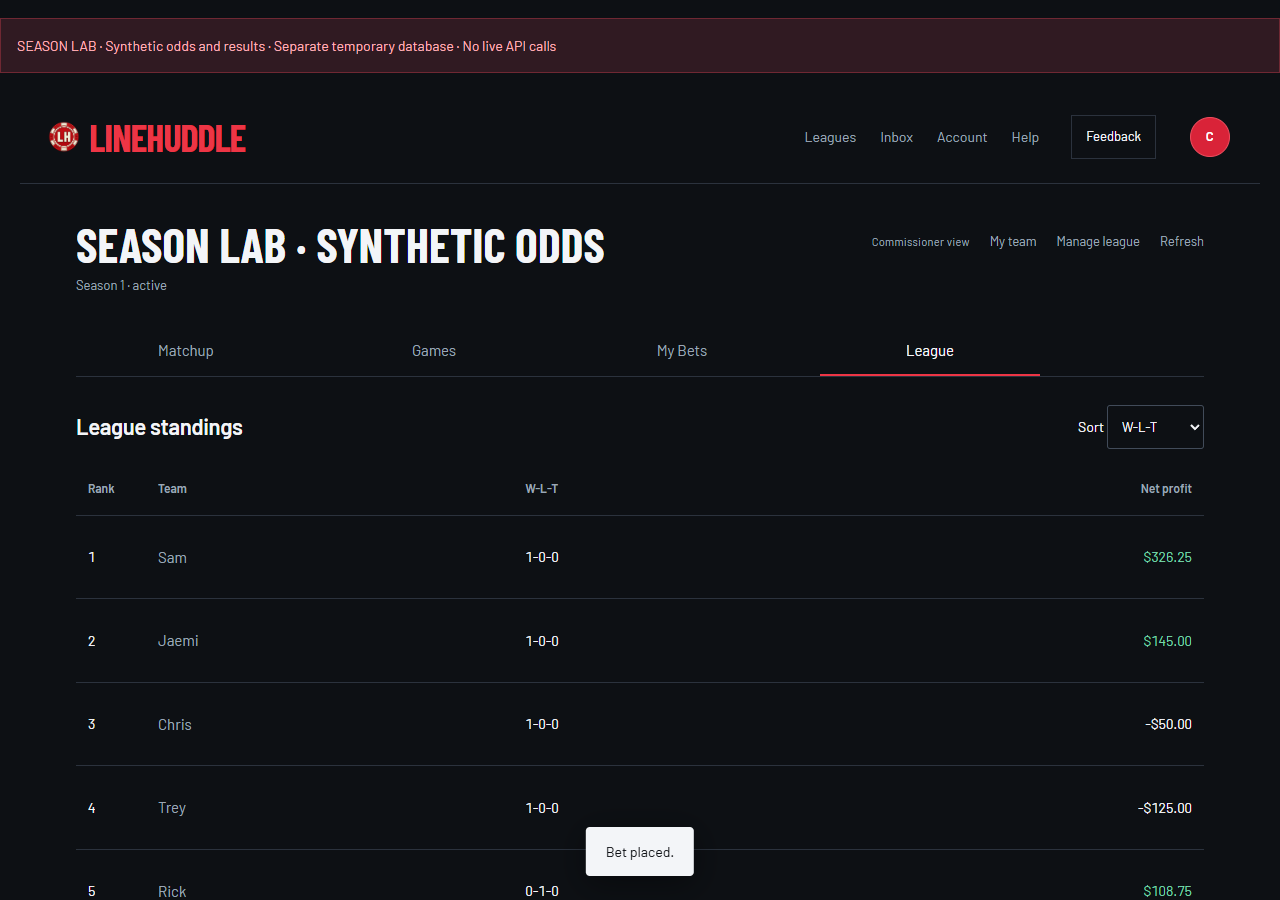
League holds the full standings, playoff bracket, teams and season history. Standings use wins, then ties, then regular-season net profit. If those tie, seeding compares winning tickets, best winning-ticket profit and finally a recorded random draw.
Choose Net profit in Sort to see who has earned the most virtual profit. Sorting changes the view, not playoff seeds. Open Season history for completed weeks and their tickets.
THE TITLE RUNMake the cut. Finish the job.
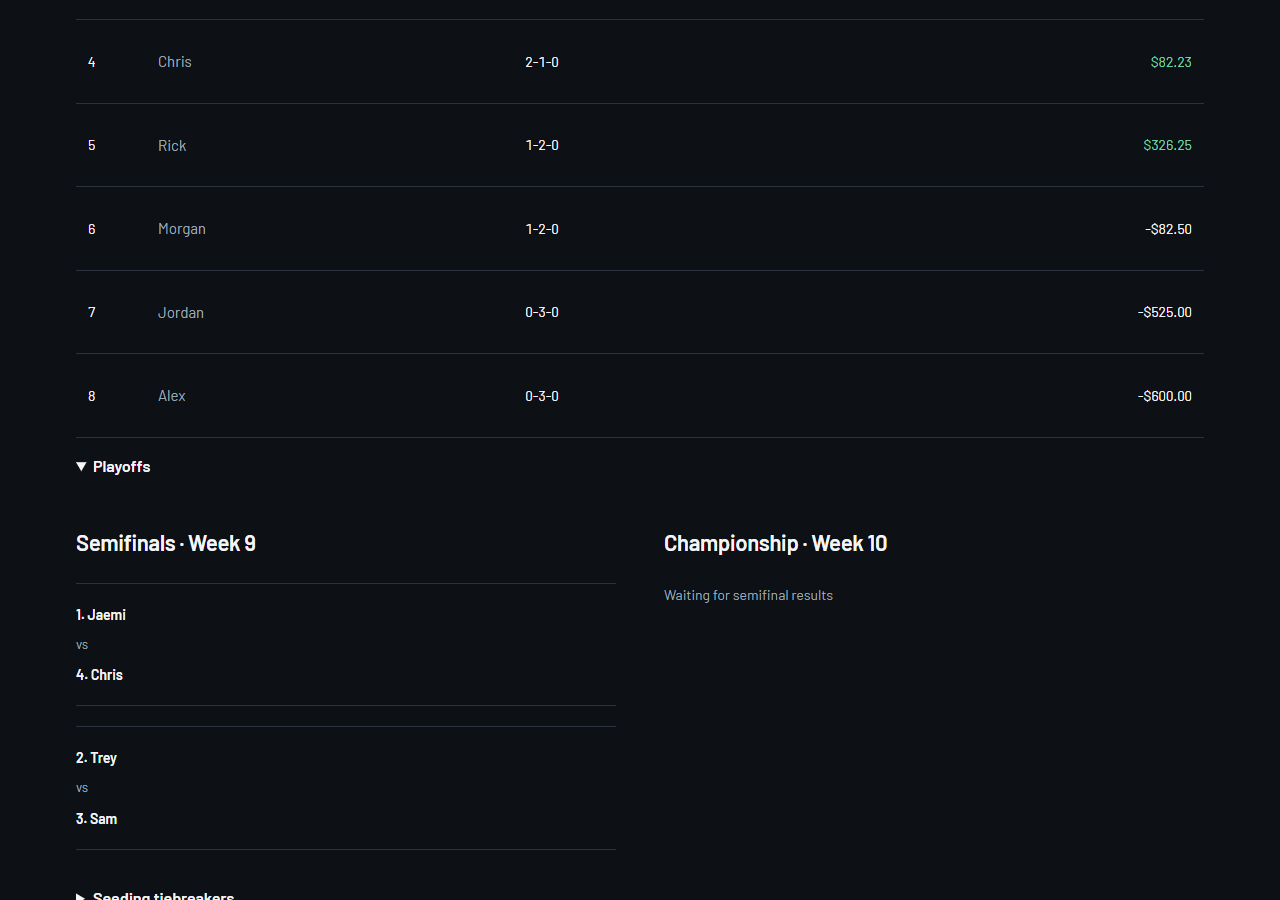
When playoffs are enabled, the top four seeds enter semifinals: 1 vs 4 and 2 vs 3. Winners meet in the championship. Open League, then Playoffs, to see the bracket. The default full-season schedule ends with semifinals in Week 16 and the championship in Week 17; check your league settings for your actual dates and playoff bankroll.
A tied playoff matchup uses the league’s selected tiebreaker, normally the higher seed. Profit-based alternatives then compare current-round winning tickets, best ticket profit and higher seed if needed. Settings show which rule applies.
What happens after a late result correction?
Results and records update automatically. A later round can be rebuilt until it accepts its first bet. After that, its matchups stay locked so already accepted bets remain valid. The league keeps a correction history.
After the season finishes, the commissioner can archive it and create a rematch. Completed records remain available. Six-team brackets, divisions, multisport leagues and continuous bankroll are future features, not current v1 modes. League Plus is planned for v2.
WE’RE LISTENINGSomething off? Tell us.
Use Feedback in the header to report a bug, suggest something or flag a confusing screen. It includes the screen and league context. Your message is private to you and LineHuddle support.
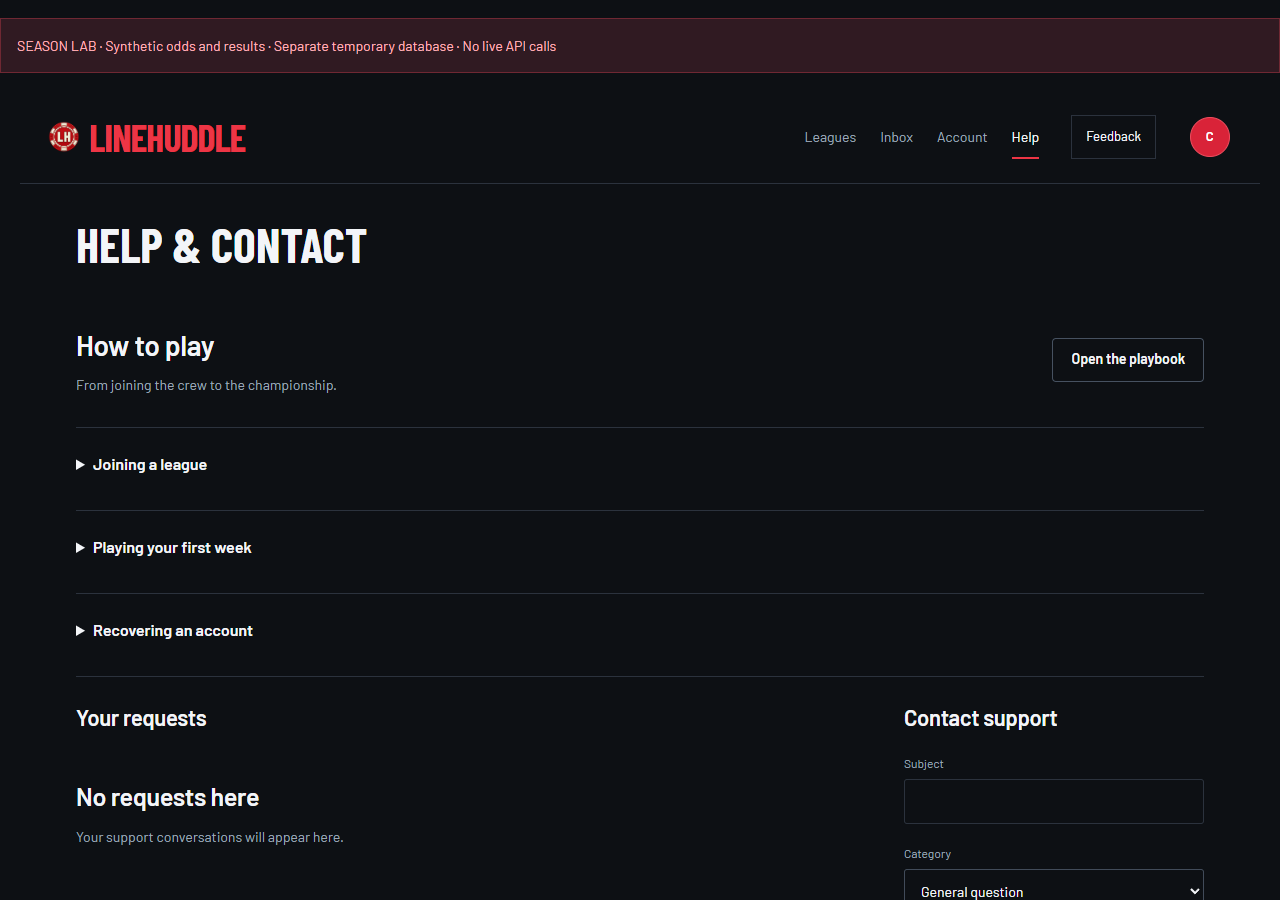
Open Help to create a support request or read replies under Your requests. Add what you were trying to do, what happened and your device/browser. Never include passwords, recovery codes or verification links. Replies stay in the conversation; don’t rely on an email notification during the restricted pilot.
Can’t sign in?
Google users should choose their original Google account. For a username account, choose Forgot your password? and use your verified email, or Use a recovery code with your username and saved code. A reset replaces old sessions and the old recovery code. During restricted testing, email delivery is limited to the approved tester inbox.
TAKE A PRACTICE RUNA season you can fast-forward.
Try the demo to explore sample tickets, weeks and playoffs. Its season replay is a simulation saved in your browser. It does not create a shared league, invite friends, use your account bankroll or place tickets in the hosted app.
The account app at /app is the shared league experience. It accepts bets only with a valid current feed and open competition week. The pilot feed may pause at its credit limit. New bets and real-game settlement are separate steps: accepted tickets wait for real final results.